
Compliance overview
Who this is for
Section titled “Who this is for”Compliance managers and owners. The screen needs the permission View driver files (compliance.driver_files.read). The roles Owner, Admin and Read only have it.
Before you start
Section titled “Before you start”- At least one driver file. A driver file opens when a driver is added in People > Directory, hired in Recruit, or when the full application is sent to a candidate.
- Open Compliance in the menu on the left. Overview opens first, with the title Compliance overview.
- Read the counts under Driver files of hired drivers: Compliant, Pending, Expired, Eligible to drive, Not eligible, Waiting for review (with how long ago the oldest document was sent) and Expiring in 30 days. Select a count to open the matching list in Driver files or Expirations.
- To see one terminal only, choose it in All terminals at the top right.
- Under What is missing, choose Active drivers or Hiring. The table lists everyone who is not eligible to drive, nearest to eligible first, with What is missing, Waiting on (the driver, the company or a previous employer) and Not eligible for. To see only what waits on one party, use Waiting on.
- Select a row to open the driver file of that person.
Open the screenshot at full size in a new tab: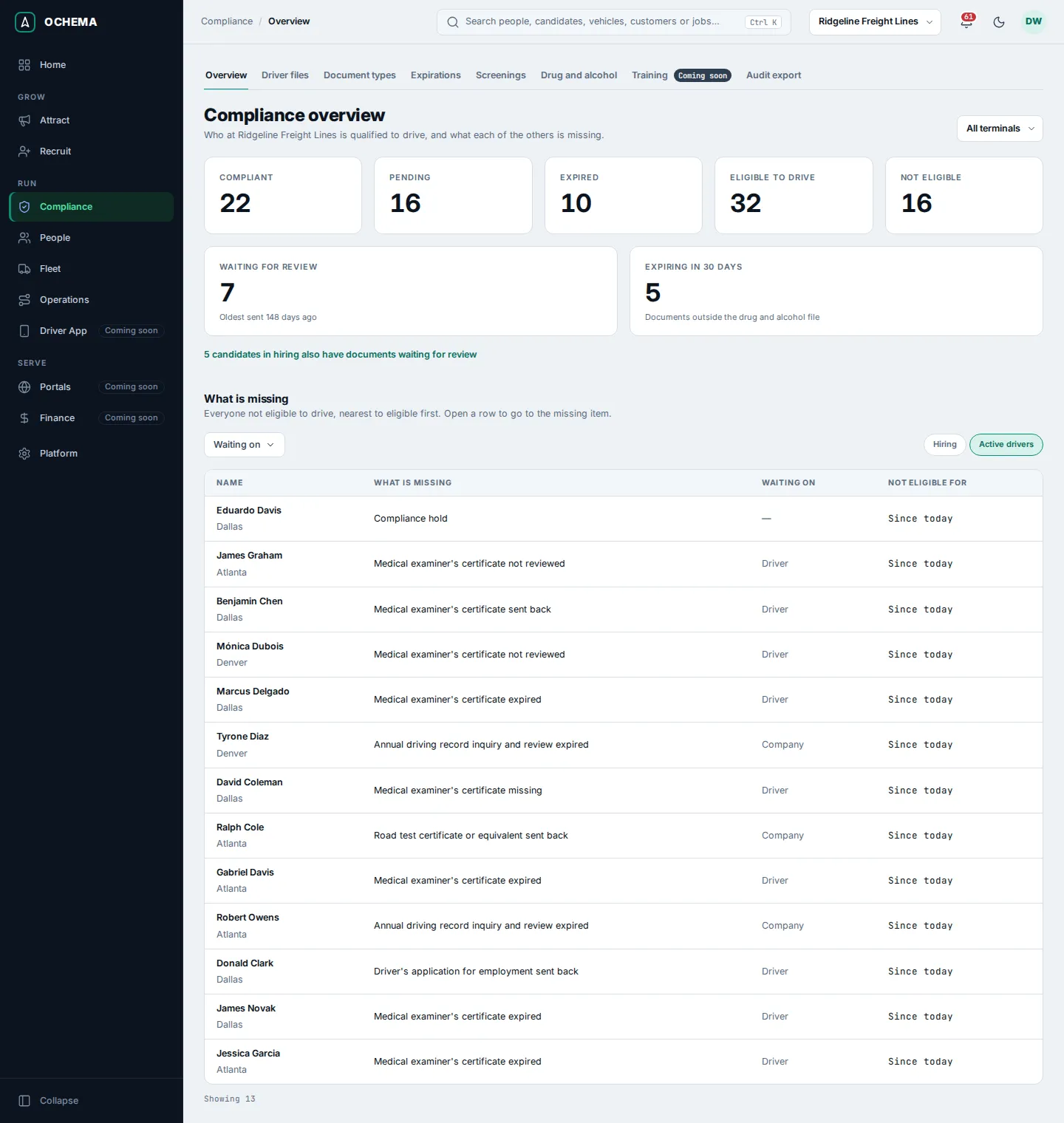
What happens next
Section titled “What happens next”You work each missing item on the driver file: see Driver files. A line such as Compliance hold means a record of the drug and alcohol file keeps the person from driving; the overview never says why. Only people who can open the drug and alcohol file see the reason (see Drug and alcohol file).
When a candidate in hiring also has documents waiting for review, a link under the counts says how many and opens them.
Sensitive data
Section titled “Sensitive data”The Social Security number, the date of birth and the license number a driver gives in the full application are encrypted and show masked everywhere. Reveal, on the Application tab of the candidate, shows one of them in full; in Audit export, Show full identifiers shows them in the PDF. Both need the permission Reveal sensitive data (compliance.sensitive_data.reveal), which only the Owner role has among the built-in roles. Each reveal, and each value shown in an export, is recorded with who saw what, of whom and when, in the audit log of the company.
The results of the drug and alcohol file are only shown to people who can open that file. See Drug and alcohol file.