
Lead intake API
The lead intake API takes one lead per request from another system: your own website form, a job board feed, another applicant tracking system. Each lead goes through the same intake as your careers page: the candidate is found or created, the application is added, and the lead shows in Attract > Leads with Captured by set to API.
Who this is for
Section titled “Who this is for”- To see the keys: See the keys of the lead intake API (
platform.lead_api_keys.read). - To create and revoke keys: Create and revoke keys of the lead intake API (
platform.lead_api_keys.manage). - The developer who connects the other system. The key is a secret: call the API from a server, never from a web page.
Before you start
Section titled “Before you start”- The Recruit module must be on for your company. With it off, the API answers 403
module_disabled. - To send leads for a job, the job must be open or paused. Take its id, or the address of its public page (see Jobs).
Create a key
Section titled “Create a key”- Open Platform in the menu on the left, then Integrations. The Lead intake API tab opens.
- Select Create key.
- In Create a key, type a Name after the system that will use it, for example
Website formorIndeed feed, so you know which one to revoke later. Select Create key. - In Copy your key, select Copy and store the key somewhere safe. It will not be shown again. Select Done.
The table shows each key with its Name, the first characters of the Key, Created by, Created, Last used and Status. Your company can have up to 20 active keys. To stop a key, select Revoke and confirm with Revoke key: requests with it stop working right away, and the leads it already sent stay where they are. This cannot be undone.
The screen also has an Example request with your address, and the API reference link opens the full description of the route.
Open the screenshot at full size in a new tab: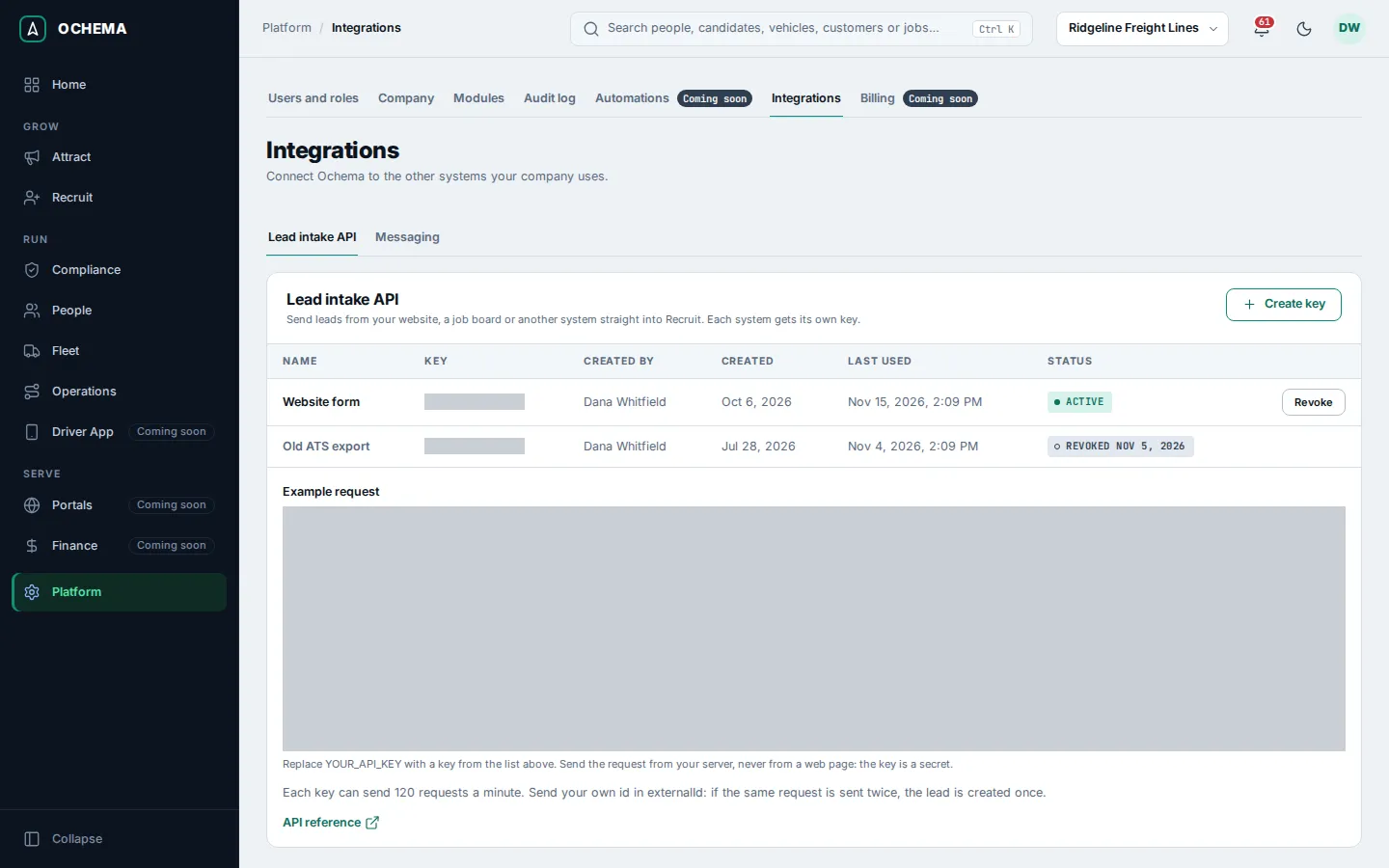
Send a lead
Section titled “Send a lead”Send POST /public/v1/leads to the address of your API, with the key in the Authorization header. The address and the key below are examples; use the address of the Example request and your own key.
curl -X POST https://api.example.com/public/v1/leads \ -H "Authorization: Bearer YOUR_API_KEY" \ -H "Content-Type: application/json" \ -d '{ "candidate": { "firstName": "Jordan", "lastName": "Reyes", "email": "jordan.reyes@example.com", "phone": "+12145550142", "state": "TX", "cdlClass": "A", "experienceYears": 4 }, "jobSlug": "regional-reefer-driver", "source": { "channel": "job_board", "detail": "Indeed" }, "consents": [ { "channel": "sms", "granted": true, "text": "I agree to receive text messages about jobs.", "locale": "en" } ], "externalId": "your-lead-id-1001" }'A lead that was taken in answers 201 Created:
{ "candidateId": "6f1c2a8e-0b7d-4d1e-9a51-2f6a3c9d8e10", "applicationId": "0a9b8c7d-6e5f-4a3b-8c2d-1e0f9a8b7c6d", "duplicate": false}duplicate is true when the email or the phone already belonged to a candidate of your company: the lead was added to that candidate, and no second candidate was created.
Fields
Section titled “Fields”Unknown fields are ignored with no error. A field name typed wrong is an unknown field: externalID instead of externalId is dropped.
| Field | Required | What it holds |
|---|---|---|
candidate.firstName |
Yes | 1 to 100 characters. |
candidate.lastName |
No | Up to 100 characters. A lead may arrive with one name only. |
candidate.email |
One of the two | An email address. |
candidate.phone |
One of the two | A US number in any format, or E.164 (+12145550142). |
candidate.city |
No | Up to 100 characters. |
candidate.state |
No | Two-letter US state, for example TX. |
candidate.postalCode |
No | 5-digit ZIP code or ZIP+4. |
candidate.cdlClass |
No | A, B or C; null for no CDL. |
candidate.endorsements |
No | A list of H, N, P, S, T, X, without repetition. |
candidate.experienceYears |
No | Whole years, 0 to 60. |
candidate.preferredLocale |
No | en or es: the language the candidate is contacted in. |
jobId |
No | The id of an open or paused job of your company. Without jobId and jobSlug, the lead is a general application. |
jobSlug |
No | The address of the public page of the job, instead of jobId. Send one or the other, not both. |
source.channel |
No | job_board, social_media, company_website, referral, walk_in, event, agency, qr_code or other. Absent: other. |
source.detail |
No | Up to 100 characters: the name of the job board, the event or the agency. |
source.linkCode |
No | The code of one of your tracked links (the last part of its short address). |
source.utm |
No | source, medium, campaign, term and content, up to 200 characters each. |
consents |
No | At most one per channel: sms, voice, email, ai_contact or call_recording. Each has granted (true or false), the text the person accepted (required with granted: true, up to 4,000 characters) and its locale. |
screeningAnswers |
No | Up to 50 answers, each with the questionId of a screening question of the job and its value: yes or no, a number, one option, a list of options or a text. |
externalId |
No | Your own id of the lead, up to 200 characters. |
Rules that matter:
- Same person, same candidate. A candidate with the same email or phone is reused, never created twice. A lead for a job the candidate already applied to is added to that application.
- Idempotency. Send your own id in
externalId. The sameexternalIdsent again, even at the same moment, answers 201 with the lead already created and creates nothing. - Consent date. A consent is dated when the lead arrives. A consent with
capturedAtis refused with 400 and nothing is created. - Tracked links. With
source.linkCodeof one of your links, the lead is credited to the link, with its channel, its campaign and, on a referral link, the person who referred, whateversource.channelsays. Each UTM value written on the link wins; the ones you send only fill what the link left empty. A link that is archived, or of a campaign that ended, still credits the lead. A code that is not of one of your links is ignored with no error.
Answers and limits
Section titled “Answers and limits”| Status | Code | When |
|---|---|---|
| 201 | The lead was taken in, or was already there (externalId repeated). |
|
| 400 | validation_failed |
A field is invalid. issues names each one by its path, for example candidate.email or consents.0.text. |
| 400 | invalid_reference |
jobId or jobSlug is not a job of your company. |
| 401 | unauthenticated |
The key is missing, unknown, revoked or malformed. |
| 403 | module_disabled |
Recruit is turned off for your company. |
| 403 | cross_site_request |
The request came from a web page of another site. Call the API from a server. |
| 413 | payload_too_large |
The body is larger than 100 kB. |
| 429 | rate_limited |
Past a limit. Wait the seconds of Retry-After. |
| 503 | service_unavailable |
Try the same request again after Retry-After. |
Every error has the same body: code, message, status, requestId and, for invalid fields, issues.
The limits are 120 requests a minute per key and 600 requests a minute per IP address. Every authenticated answer carries RateLimit-Limit, RateLimit-Remaining and RateLimit-Reset (seconds until the minute starts again).
What happens next
Section titled “What happens next”The lead shows in Attract > Leads with Captured by set to API, and its candidate is in Recruit with the application. The Last used column of the key shows when it last sent a lead that was taken in.